Cara membuat StopWatch Visual Studio
Tutorial kali ini kita akan membuat StopWatch dari program Visual Studio
Tambahkan label ke formulir dan ubah teksnya menjadi 00: 00: 00: 000
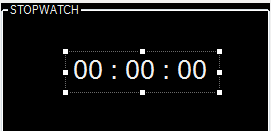
Tambahkan pewaktu ke formulir:
Di kotak alat, seret pewaktu ke formulir. Pengatur waktu akan muncul di area abu-abu di bawah formulir

Klik kanan pada Timer1 dan klik properties. Di jendela properti, ubah properti interval menjadi 1.

Tambahkan tombol dan ubah teksnya menjadi Mulai:
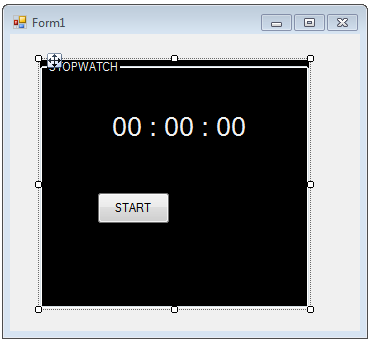
Tambahkan tombol dan ubah teksnya ke Stop:
koding stopwatch :
using System;
using System.Collections.Generic;
using System.ComponentModel;
using System.Data;
using System.Drawing;
using System.Linq;
using System.Text;
using System.Windows.Forms;
using System.Diagnostics;
namespace stopwatch
{
public partial class Form1 : Form
{
private Stopwatch stopw = null;
public Form1()
{
InitializeComponent();
}
private void groupBox1_Enter(object sender, EventArgs e)
{
}
private void Form1_Load(object sender, EventArgs e)
{
}
private void button1_Click(object sender, EventArgs e)
{
stopw = new Stopwatch();
stopw.Start();
button1.Enabled = false;
}
private void button2_Click(object sender, EventArgs e)
{
stopw.Stop();
button1.Enabled = true;
}
private void label1_Click(object sender, EventArgs e)
{
}
private void timer2_Tick(object sender, EventArgs e)
{
if (stopw != null)
{
label1.Text = stopw.Elapsed.ToString();
}
}
}
}
using System.Collections.Generic;
using System.ComponentModel;
using System.Data;
using System.Drawing;
using System.Linq;
using System.Text;
using System.Windows.Forms;
using System.Diagnostics;
namespace stopwatch
{
public partial class Form1 : Form
{
private Stopwatch stopw = null;
public Form1()
{
InitializeComponent();
}
private void groupBox1_Enter(object sender, EventArgs e)
{
}
private void Form1_Load(object sender, EventArgs e)
{
}
private void button1_Click(object sender, EventArgs e)
{
stopw = new Stopwatch();
stopw.Start();
button1.Enabled = false;
}
private void button2_Click(object sender, EventArgs e)
{
stopw.Stop();
button1.Enabled = true;
}
private void label1_Click(object sender, EventArgs e)
{
}
private void timer2_Tick(object sender, EventArgs e)
{
if (stopw != null)
{
label1.Text = stopw.Elapsed.ToString();
}
}
}
}

Tidak ada komentar:
Posting Komentar